Dust, fingerprints, dried water droplets, and oily residue can reduce contrast or create visible flare when strong light strikes an ND filter. Cleaning the glass correctly helps preserve its optical coating while avoiding the streaks that often appear after using too much liquid or a dirty cloth.
The safest routine is simple: inspect the filter first, remove loose particles without touching the glass, and use a small amount of optical cleaning solution only when dry cleaning is not enough.
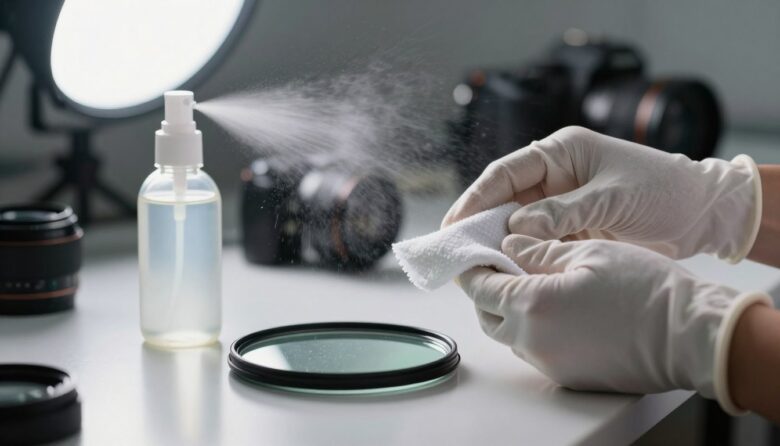
The streak-free method: use a manual bulb blower first, apply a very small amount of lens-safe cleaning solution to a clean microfiber cloth rather than directly to the filter, wipe gently from the center toward the edge, and finish with a separate dry section of cloth.
Why ND Filters Need Careful Cleaning
An ND filter sits directly in front of the lens, so contamination on its surface can interact with every light source entering the camera. A light layer of ordinary dust may have little effect in many situations, but greasy fingerprints, salt spray, dried droplets, and haze can reduce contrast or become visible around bright highlights.
Many filters also have anti-reflective, water-repellent, or oil-resistant coatings. These coatings are designed for normal use, but they should not be scrubbed with abrasive material or exposed to random household chemicals.
Clean only when necessary. Every contact with the glass creates an opportunity to drag a hard particle across the surface. If the filter has only a few loose dust particles that do not affect the image, a blower may be all that is needed.
What You Need
Manual Bulb Blower
A hand-powered blower removes loose dust without touching the filter. It is preferable to blowing with your mouth because it does not add saliva droplets or moisture.
Optical Microfiber Cloth
Use a soft, clean, lint-free cloth made specifically for lenses or optical filters. Keep it separate from cloths used on camera bodies, screens, or household surfaces.
Lens-Safe Cleaning Solution
Choose a product intended for coated photographic optics. Do not assume that a general glass cleaner is safe for an ND filter.
Soft Optical Brush
A clean lens brush can lift particles that remain after using the blower. The brush should never be touched with oily fingers or stored uncovered.
Single-Use Lens Tissue
Proper optical tissue can be useful when a washable cloth is unavailable or may already be contaminated. Use each tissue only once.
Clean Padded Surface
Work above a clean towel, filter pouch, or padded mat so the glass is less likely to be damaged if it slips from your hands.
Products and Materials to Avoid
| Item | Why it can be a problem | Safer alternative |
|---|---|---|
| Paper towels or facial tissues | May contain rough fibers, additives, or trapped particles | Optical microfiber cloth or lens tissue |
| Shirt, sleeve, or hand towel | Can carry skin oils, detergent residue, and abrasive dirt | Clean cloth reserved only for optics |
| Household window cleaner | May leave residue or contain chemicals not intended for optical coatings | Manufacturer-approved lens cleaning solution |
| Dish soap or general-purpose cleaner | Can leave film around the glass and filter frame | Optical cleaner used sparingly |
| Aerosol canned air | Can release cold liquid or propellant if used incorrectly | Manual rubber bulb blower |
| Dirty or frequently reused cloth | May redeposit grease or drag trapped grit across the coating | Freshly cleaned cloth or single-use tissue |
| Large amount of cleaning liquid | Can create streaks and seep around the frame or rotating mechanism | One or two drops applied to the cloth |
Do not improvise with alcohol, vinegar, acetone, or another solvent unless the filter manufacturer specifically approves it. Filter construction and coatings vary, so a mixture that is acceptable for one product may be unsuitable for another.
Step-by-Step Cleaning Process
- Wash and dry your hands. Clean hands reduce the chance of transferring fresh oil to the frame, cloth, or glass.
- Prepare a clean workspace. Work indoors or in a sheltered area away from wind, sand, cooking grease, and heavy dust. Place a soft surface beneath the filter.
- Remove the filter when practical. Hold a round filter by its metal frame and a square filter by its edges. Removing it gives access to both surfaces and prevents cleaning fluid from reaching the lens.
- Inspect the glass under angled light. Rotate the filter slowly near a lamp or window. Identify loose dust, fingerprints, dried droplets, and damaged areas before touching the surface.
- Blow away loose particles. Hold the filter at a slight downward angle and use several short bursts from a manual bulb blower. This allows dislodged particles to fall away.
- Use a soft brush only if needed. Very lightly lift remaining particles with a clean optical brush. Do not press or scrub.
- Apply solution to the cloth. Place one or two drops on a clean section of microfiber. The cloth should be lightly damp, not wet. Never pour or spray cleaner directly onto the filter.
- Wipe gently from the center outward. Use light, overlapping circular movements or smooth center-to-edge strokes. Avoid pressing hard around dried debris.
- Dry with a separate section. Before the remaining moisture forms a film, use a clean and dry part of the cloth to remove faint streaks.
- Inspect both sides again. View the filter from several angles. Repeat only the specific area that still has residue rather than cleaning the entire surface again.
- Clean the frame carefully. Wipe the metal frame and threads with a different dry cloth. Keep moisture away from the edges of the glass and the rotating ring of a variable ND filter.
- Store the filter only when fully dry. Moisture trapped inside a case can encourage residue, odor, or fungal growth during long storage.
How to Avoid Streaks
Streaks are normally caused by excessive liquid, oily cleaning material, or residue being spread across the glass rather than removed.
Cleaning Different Types of ND Filters
Round Screw-In Filters
Hold the filter by the outer ring and avoid squeezing it strongly. Clean the front and rear surfaces separately. Inspect the threads for sand or dried dirt before reinstalling the filter.
If the filter is stuck on the lens, do not use excessive force or metal tools. A filter wrench or a broad rubber grip can apply more even pressure without crushing the ring.
Square and Rectangular Filters
Large filter surfaces are easier to touch accidentally. Hold them by the edges and clean above a padded table. Support the glass during wiping instead of holding it in the air with one hand.
Check the foam gasket on strong ND filters. Loose fibers, sand, or dried moisture around the gasket should be removed carefully without pulling or deforming it.
Variable ND Filters
A variable ND contains rotating optical elements. Use very little liquid and keep it away from the gap between the moving and fixed rings. Turn the ring after cleaning to confirm that it moves normally and that no fluid has entered the mechanism.
Inspect both optical surfaces at several rotation positions. A mark on one polarizing layer may become easier to see as the filter is adjusted.
Resin Filters
Resin filters can scratch more easily than glass. Use minimal pressure, remove every loose particle first, and follow the specific instructions supplied by the manufacturer.
How to Remove Common Marks
| Contamination | Recommended approach | What to avoid |
|---|---|---|
| Loose dust | Manual blower followed by a soft optical brush if necessary | Immediately wiping the dry surface |
| Fingerprint or skin oil | Small amount of optical cleaner on fresh microfiber | Repeated dry rubbing with a greasy cloth |
| Fresh rain droplets | Blot gently with clean material, then finish with optical cloth | Letting mineral-rich water dry on the surface |
| Dried water spots | Soften with a small amount of approved cleaner before wiping | Scraping the deposit with a fingernail or hard object |
| Salt spray | Remove promptly using manufacturer-approved cleaning fluid and multiple clean cloth sections | Rubbing dry salt crystals across the glass |
| Mud or sand | Remove loose material with air first and clean only after all grit is gone | Pressing a cloth directly onto visible particles |
For stubborn deposits: repeat several gentle cleaning passes rather than applying heavy pressure. Stop if a mark does not change, because it may be coating damage, a scratch, or contamination inside the filter rather than removable dirt.
How Often Should an ND Filter Be Cleaned?
There is no useful fixed schedule for wet cleaning. The filter should be inspected before an important shoot and cleaned when contamination is visible or begins to affect the image.
- Ordinary indoor use: a blower and occasional inspection may be enough.
- Dusty or sandy locations: inspect after each session and remove loose particles before storage.
- Rain, sea spray, or waterfalls: clean water and mineral residue as soon as practical.
- Frequent handling: inspect for fingerprints whenever the filter is changed.
- Long-term storage: make sure the filter is clean and completely dry before closing the case.
Cleaning a spotless filter every week does not automatically protect it. Unnecessary wiping only increases contact with the coating.
Storage After Cleaning
Compact Field Cleaning Kit
A practical kit does not need to be large. A small sealed pouch can hold:
- A manual bulb blower
- A clean optical brush with a protective cap
- Two individually stored microfiber cloths
- A small bottle of approved lens cleaning solution
- Several single-use lens tissues
- A soft surface or clean filter pouch
Keep one cloth for dry finishing and another for damp cleaning. Replace or wash a cloth immediately if it falls on the ground, touches sunscreen, or is used on a dirty camera body.
Frequently Asked Questions
Can I clean an ND filter with only a microfiber cloth?
A microfiber cloth may be enough for a light fingerprint, but loose dust and grit should be removed with a blower first. Wiping visible particles directly can scratch the surface.
Should cleaning solution be sprayed directly onto the filter?
No. Apply a very small amount to the cloth or lens tissue. Direct spraying can leave excess liquid around the frame, inside a variable filter mechanism, or between bonded components.
Can I use isopropyl alcohol?
Only when the filter manufacturer specifically approves it and provides appropriate instructions. Coatings and construction differ, so a dedicated optical cleaner is the safer general choice.
Why does the filter still look greasy after cleaning?
The cloth may be dirty, too much liquid may have been used, or the same section may be spreading oil. Repeat the process with a fresh cloth section and less solution.
Is it safe to breathe on the filter before wiping it?
It is better to use a proper optical cleaning solution. Breathing can add moisture and tiny saliva droplets, and it provides less control than applying a measured amount of cleaner to a cloth.
Can a scratched ND filter be polished?
Polishing is not recommended because it can alter the coating, surface flatness, or density. A visible scratch should be evaluated through test images, and the filter should be replaced if it causes flare or loss of contrast.
Should the filter be removed from the lens before cleaning?
Removing it is normally preferable because both surfaces and the frame can be inspected. It also reduces the chance of transferring cleaning liquid to the lens. Handle the filter over a padded surface.
How can I tell whether a mark is inside the filter?
Clean both external surfaces and inspect the filter under angled light. If the mark remains fixed beneath the surface, it may be internal separation, trapped contamination, or coating damage that cannot be removed through ordinary cleaning.
Final Recommendation
A clean ND filter does not require aggressive scrubbing or large amounts of liquid. Remove loose particles first, use optical cleaning products sparingly, and finish with a clean, dry section of microfiber.
The most important habits are keeping cleaning tools free of grit, handling the filter by its frame or edges, and following the manufacturer’s instructions whenever they differ from general guidance.

The OptiFilter Labs Editorial Team creates practical, carefully researched content about ND filters, camera accessories, exposure control, photography techniques, and video production. Our goal is to help photographers and filmmakers understand their equipment, solve common problems, and make more informed purchasing decisions.